
Task Sizing: DevEx Survey Questions to Help Teams Break Work Into Smaller Steps

In our DevEx AI tool, we use two sets of survey questions: DevEx Pulse (one question per area to track overall delivery performance) and DevEx Deep Dive (a focused root-cause diagnostic when something needs attention).
DevEx Pulse tells us where friction is. DevEx Deep Dive tells us why it exists.
Let’s take a closer look at task batching. If the Pulse question “Our tasks are well-sized for efficient work” receives low scores and developers’ comments reveal significant friction and blockers, what should you do next?
Here are 14 deep dive questions you can ask your developers to uncover the causes of friction in task batching, along with guidance on how to interpret the results, common patterns engineering teams encounter, and practical first steps for improvement. This will help you pinpoint what’s causing the problem and fix it on your own, or move faster with our DevEx AI tool and expert guidance.
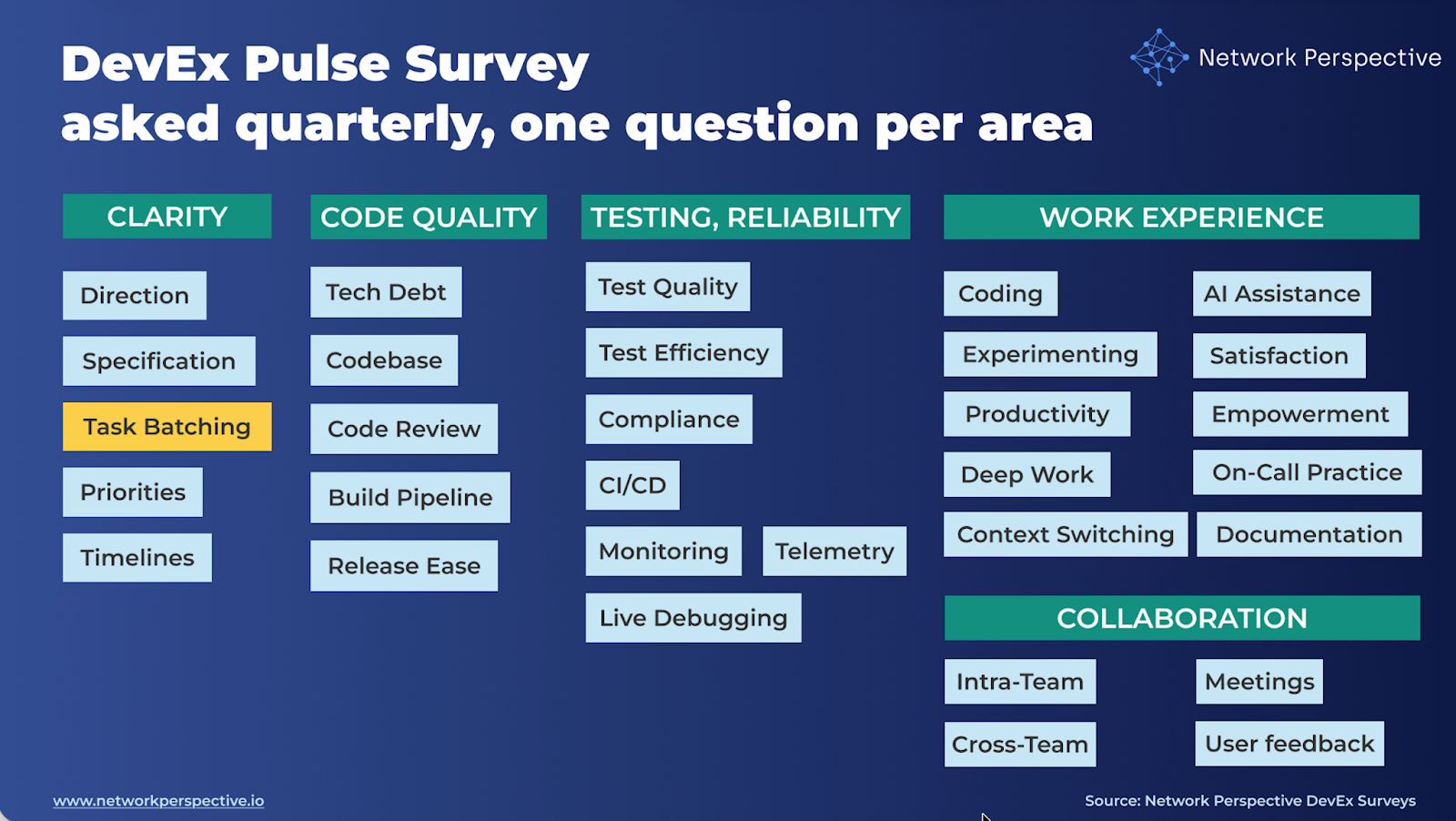
Task batching — DevEx Survey Questions for Engineering Teams
The real question is: Whether tasks are easy to start, work on, and finish — or grow, get blocked, and spill over.
Deep dive questions should help you map how task batching flows through your delivery process and identify where it breaks down:
Clarity → Size → Independence → Flow → Delivery → Intent → Cost
Here’s how the DevEx AI tool helps uncover this.
Size
Are tasks a good size to work on?
- Size / Most tasks are small enough to work on without feeling heavy or overwhelming.
- Focus / Most tasks focus on one main thing instead of trying to do many things at once.
Readiness
Is work clear enough when it starts?
- Clear / When a task starts, it’s clear enough to break it down and begin work.
- Known / Most of the important work and complexity is known before I start the task.
Dependencies
Can work move forward without waiting on others?
- Independent / I can usually work on a task without waiting on other people or teams.
- Unblocked / Tasks usually move forward without being blocked by missing decisions or dependencies.
Flow
Can tasks be finished smoothly once started?
- Finishable / Once I start a task, I can usually finish it without long stops or delays.
- Fits / Tasks usually fit within a day or sprint without spilling over unexpectedly.
Delivery
Are tasks easy to review and ship?
- Reviewable / Tasks are small enough that code reviews are quick and clear.
- Shippable / Tasks are small enough that testing and releasing them is straightforward.
Pressure
Why are tasks sized the way they are?
- Intentional / Tasks are split on purpose to make steady progress easier.
- Balanced / Tasks are sized to support good planning and delivery, not just deadlines.
Effort
- Weekly / Thinking about poorly sized or hard-to-finish tasks (like tasks that are too big, unclear at the start, blocked by dependencies, or hard to review and ship), about how much time do you spend in a typical week dealing with this?
- None
- Less than 1 hour
- 1–2 hours
- 3–5 hours
- 6–10 hours
- More than 10 hours
Open-ended question (comments)
What’s missing or not working well for you here?
How to Analyze DevEx Survey Results on Task Batching?
Are tasks easy to start, work on, and finish — or do they grow, get blocked, or spill over?
Here’s how the DevEx AI tool helps make sense of the results.
How to Read Each Section
Size
Questions
- Size – Tasks are a good size to work on
- Focus – Tasks focus on one main thing
What this section tests
Whether tasks are small and focused enough to work on comfortably.
How to read scores
- Size ↓, Focus ↓
→ Tasks are too big and trying to do too many things. - Size ↓, Focus ↑
→ Tasks have a clear goal but are still too large. - Size ↑, Focus ↓
→ Tasks are small but mixed or poorly sliced. - Size ↑, Focus ↑
→ Healthy task sizing.
Key insight
When tasks feel heavy, it’s usually because scope and focus are mixed together.
Open-ended comments
Prompt: “What could be better here?”
How to read responses
- Mentions of “too much in one task” → over-bundling
- Mentions of “hard to understand” → mixed focus
- Concrete examples → strong signal
Key insight
Task size complaints usually point to how work is grouped, not effort levels.
Readiness
Questions
- Clear – Tasks are clear when they start
- Known – Most work is known before starting
What this section tests
Whether work is ready to be broken down before tasks are created.
How to read scores
- Clear ↓, Known ↓
→ Tasks are created before understanding is complete. - Clear ↑, Known ↓
→ Tasks look clear, but hide complexity. - Clear ↓, Known ↑
→ Information exists, but isn’t surfaced clearly. - Clear ↑, Known ↑
→ Good readiness before starting.
Key insight
Poor batching often starts upstream, before tasks even exist.
Open-ended comments
How to read responses
- “We found out later…” → premature task creation
- “Specs weren’t ready” → readiness gap
- “We just start” → normalized uncertainty
Key insight
Hidden work is a sign of starting too early, not bad estimation.
Dependencies
Questions
- Independent – Tasks can be worked on without waiting
- Unblocked – Tasks usually move forward smoothly
What this section tests
Whether tasks are sliced to reduce waiting and coordination.
How to read scores
- Independent ↓, Unblocked ↓
→ Tasks are tightly coupled to other people or teams. - Independent ↓, Unblocked ↑
→ Dependencies exist but are absorbed informally. - Independent ↑, Unblocked ↓
→ Work is independent in theory, blocked in practice. - Independent ↑, Unblocked ↑
→ Healthy decoupling.
Key insight
Large tasks are often a workaround for dependency pain.
Open-ended comments
How to read responses
- Mentions of approvals or handoffs → dependency bottlenecks
- Mentions of other teams → cross-team coupling
- “Waiting most of the time” → flow breakdown
Key insight
When work waits, tasks grow to make waiting “worth it”.
Flow
Questions
- Finishable – Tasks can be finished once started
- Fits – Tasks fit within a day or sprint
What this section tests
Whether tasks fit human focus and time limits.
How to read scores
- Finishable ↓, Fits ↓
→ Tasks exceed natural flow limits. - Finishable ↑, Fits ↓
→ Tasks start well but are too big to finish. - Finishable ↓, Fits ↑
→ External interruptions dominate. - Finishable ↑, Fits ↑
→ Healthy flow.
Key insight
Tasks that don’t fit kill momentum and increase cognitive load.
Open-ended comments
How to read responses
- Mentions of interruptions → context switching
- Mentions of “too big to finish” → sizing issue
- Mentions of fatigue → flow limits exceeded
Key insight
Flow problems show up as slow progress, not complaints.
Delivery
Questions
- Reviewable – Tasks are easy to review
- Shippable – Tasks are easy to test and release
What this section tests
Whether tasks are sized for fast feedback and safe delivery.
How to read scores
- Reviewable ↓, Shippable ↓
→ Tasks are too large for safe delivery. - Reviewable ↓, Shippable ↑
→ Reviews are the main bottleneck. - Reviewable ↑, Shippable ↓
→ Testing or release is the constraint. - Reviewable ↑, Shippable ↑
→ Healthy end-to-end flow.
Key insight
Delivery pain is often where batching problems become visible first.
Open-ended comments
How to read responses
- “Too big to review” → batching issue
- “Hard to test” → downstream overload
- “Risky to ship” → late risk discovery
Key insight
Big tasks hide risk until it’s expensive to fix.
Pressure
Questions
- Intentional – Tasks are split on purpose
- Balanced – Tasks aren’t sized just to hit deadlines
What this section tests
Whether batching decisions are deliberate or pressure-driven.
How to read scores
- Intentional ↓, Balanced ↓
→ Deadlines drive task size. - Intentional ↓, Balanced ↑
→ No clear batching strategy. - Intentional ↑, Balanced ↓
→ Good intent, overridden by pressure. - Intentional ↑, Balanced ↑
→ Healthy planning discipline.
Key insight
Task size reflects what the organization optimizes for.
Open-ended comments
How to read responses
- Mentions of deadlines → schedule pressure
- Mentions of tracking/reporting → planning artifacts
- “No time to split” → false urgency
Key insight
When pressure rises, tasks inflate.
Pattern Reading (Across Sections)
Pattern — “Too Big to Flow”
How common: Often
Pattern:
Size ↓ | Flow ↓ | Delivery ↓
Interpretation
Tasks exceed human and system flow limits.
Pattern — “Started Too Early”
How common: Common
Pattern:
Readiness ↓ | Known ↓ | Flow ↓
Interpretation
Tasks are created before clarity and decisions exist.
Pattern — “Bundled Around Waiting”
How common: Medium
Pattern:
Dependencies ↓ | Unblocked ↓ | Pressure ↓
Interpretation
Tasks grow to survive waiting and coordination cost.
Pattern — “Deadline Shaped Work”
How common: High in delivery-driven teams
Pattern:
Pressure ↓ | Size ↓ | Fits ↓
Interpretation
Task size is optimized for commitments, not flow.
How to Read Contradictions (This Is Where Insight Is)
Contradiction Clear ↑, Known ↓
Work looks ready but isn’t.
Contradiction Independent ↑, Unblocked ↓
Dependencies are social, not technical.
Contradiction Finishable ↑, Fits ↓
Tasks start strong but are too large.
Contradiction Intentional ↑, Balanced ↓
Good intent overridden by deadlines.
Contradictions show where the system forces people to compensate.
Final Guidance — How to Present Results
What NOT to say
- “Engineers should break tasks down better”
- “We need better estimates”
- “People need more discipline”
What TO say (use this framing)
“Task size reflects how ready and unblocked the work is — not developer skill.”
“Large tasks are usually a signal of pressure, dependencies, or unclear work.”
One Powerful Way to Present Results
Show only three things:
- What makes tasks grow too large
- Where work gets blocked or spills over
- How deadlines shape task size
Using DevEx Task Batching Insights to Improve How Teams Break Down Work
Here’s how the DevEx AI tool will guide you toward making first actions.
First Steps Per Section
Size
Signal: Tasks are too big or mixed.
First steps
- Introduce a “one change per task” rule where possible.
- Require that tasks answer one clear question: “What single thing changes?”
- If a task touches multiple components or behaviors, split it.
Small operational change - add a simple planning check: “If this task takes more than 2–3 days or touches multiple systems, split it.”
Readiness
Signal: Tasks start before work is understood.
First steps
- Introduce a 5-minute readiness check before starting a task: What problem are we solving?; What changes?; What might surprise us?
- Allow tasks to move to development only if these are known.
Small operational change - add a lightweight “Ready to Start” checklist:
- Problem clear
- Expected outcome clear
- Known risks noted
Dependencies
Signal: Tasks wait on others.
First steps
- Identify top 3 recurring blockers (teams, approvals, systems).
- For each dependency, define one early check before work begins.
Example: “Does this require another team or system change?”
Small operational change - add dependency mapping during task creation: “Who else might this affect?”
Flow
Signal: Tasks start but stall or spill over.
First steps
- Encourage tasks that fit within 1–3 days of focused work.
- If a task stalls: split remaining work; remove dependency; escalate decision.
Small operational change - add a daily question in stand-ups: “Is this task still finishable?”
Delivery
Signal: Tasks are too big to review or ship.
First steps
- Encourage smaller PRs (e.g., under ~400–500 lines changed).
- Ship partial improvements instead of bundled releases.
Small operational change - adopt a rule: “If a PR feels hard to review, the task was too large.”
Pressure
Signal: Tasks are sized to satisfy deadlines.
First steps
- When planning deadlines, ask: “What would the smallest useful version look like?”
- Track whether tasks are inflated to hit milestones.
Small operational change - introduce “smallest useful step” planning before task creation.
First Steps for Patterns
Pattern — “Too Big to Flow”
(Size ↓ + Flow ↓ + Delivery ↓)
First step
Introduce smaller vertical slices:
Instead of: “Build feature X”, create tasks like:
- add endpoint
- show data
- enable user action
- improve behavior
Goal: deliver value in small increments.
Pattern — “Started Too Early”
(Readiness ↓ + Known ↓ + Flow ↓)
First step
Add a 10-minute clarification step before task creation. Ask:
- What problem are we solving?
- What does success look like?
- What could surprise us?
This reduces hidden work dramatically.
Pattern — “Bundled Around Waiting”
(Dependencies ↓ + Unblocked ↓)
First step
Make dependencies visible early.
Simple practice: Every task lists who or what it depends on. Teams can then reorder work before starting.
Pattern — “Deadline Shaped Work”
(Pressure ↓ + Size ↓ + Fits ↓)
First step
Change the planning language from: “Finish this feature” to: “Deliver the smallest working step toward this goal.” This alone often shrinks tasks by 2–3×.
First Steps for Contradictions
Contradictions reveal system tension.
Contradiction Clear ↑, Known ↓
Work looks clear but hides complexity.
First step
Require tasks to include: “What could surprise us?”. This exposes hidden unknowns early.
Contradiction Independent ↑, Unblocked ↓
Dependencies exist but are informal.
First step
Add one question at task creation: “Who might we need to coordinate with?”
Contradiction Finishable ↑, Fits ↓
Tasks start well but grow too large.
First step
Introduce mid-task splitting. If a task grows:
- finish the current slice
- create a follow-up task.
Contradiction Intentional ↑, Balanced ↓
Teams want good batching but deadlines override.
First step
Introduce “smallest releasable step” planning. Before committing, ask: “What is the smallest version we could ship?”
The Core Improvement Rule
Improve task size by fixing the system before the task. Large tasks rarely come from developer behavior. They usually come from:
- unclear work
- hidden dependencies
- deadline pressure
- lack of slicing strategy.
Fix those first.
The Most Powerful First Step Overall
Introduce a “Smallest Step First” planning habit.mBefore creating tasks, ask: “What is the smallest useful change we can deliver next?” This single change improves:
- task size
- flow
- review speed
- release safety
- developer focus
all at once.
There’s Much More to DevEx Than Metrics
What you’ve seen here is only a small part of what the DevEx AI platform can do to improve delivery speed, quality, and ease.
If your organization struggles with fragmented metrics, unclear signals across teams, or the frustrating feeling of seeing problems without knowing what to fix, DevEx AI may be exactly what you need. Many engineering organizations operate with disconnected dashboards, conflicting interpretations of performance, and weak feedback loops — which leads to effort spent in the wrong places while real bottlenecks remain untouched.
DevEx AI brings these scattered signals into one coherent view of delivery. It focuses on the inputs that shape performance — how teams work, where friction accumulates, and what slows or accelerates progress — and translates them into clear priorities for action. You gain comparable insights across teams and tech stacks, root-cause visibility grounded in real developer experience, and guidance on where improvement efforts will have the highest impact.
At its core, DevEx AI combines targeted developer surveys with behavioral data to expose hidden friction in the delivery process. AI transforms developers’ free-text comments — often a goldmine of operational truth — into structured insights: recurring problems, root causes, and concrete actions tailored to your environment.
The platform detects patterns across teams, benchmarks results internally and against comparable organizations, and provides context-aware recommendations rather than generic best practices.
Progress on these input factors is tracked over time, enabling teams to verify that changes in ways of working are actually taking hold, while leaders maintain visibility without micromanagement. Expert guidance supports interpretation, prioritization, and the translation of insights into measurable improvements.
To understand whether these changes truly improve delivery outcomes, DevEx AI also measures DORA metrics — Deployment Frequency, Lead Time for Changes, Change Failure Rate, and Mean Time to Recovery — derived directly from repository and delivery data. These output indicators show how software performs in production and whether improvements to developer experience translate into faster, safer releases.
By combining input metrics (how work happens) with output metrics (what results are achieved), the platform creates a closed feedback loop that connects actions to outcomes, helping organizations learn what actually drives better delivery and where further improvement is needed.
Returning to our topic — task batching — you can explore proven practices grounded in hundreds of interviews our team has conducted with engineering leaders.

